
May 08, 2026
After QuickBooks Desktop: What CPAs Need to Know Now



By Ryan J. Almusawi, EA, MPAcc, and Nancy V. Cossio
Change is constant, particularly for users of Intuit's QuickBooks software. As of September 30, 2024, Intuit stopped selling new subscriptions to most QuickBooks Desktop products in the United States, shifting toward its software-as-a-service (SaaS) offering, QuickBooks Online. To the dismay of many small to medium-sized businesses, bookkeepers and accountants have scrambled to provide support during this major transition. In response, CPAs must take a proactive approach by monitoring discontinuation timelines and any additional updates from Intuit, and by communicating potential failure points to clients to ensure smooth transitions for clients.
What did Intuit actually announce regarding QuickBooks Desktop?
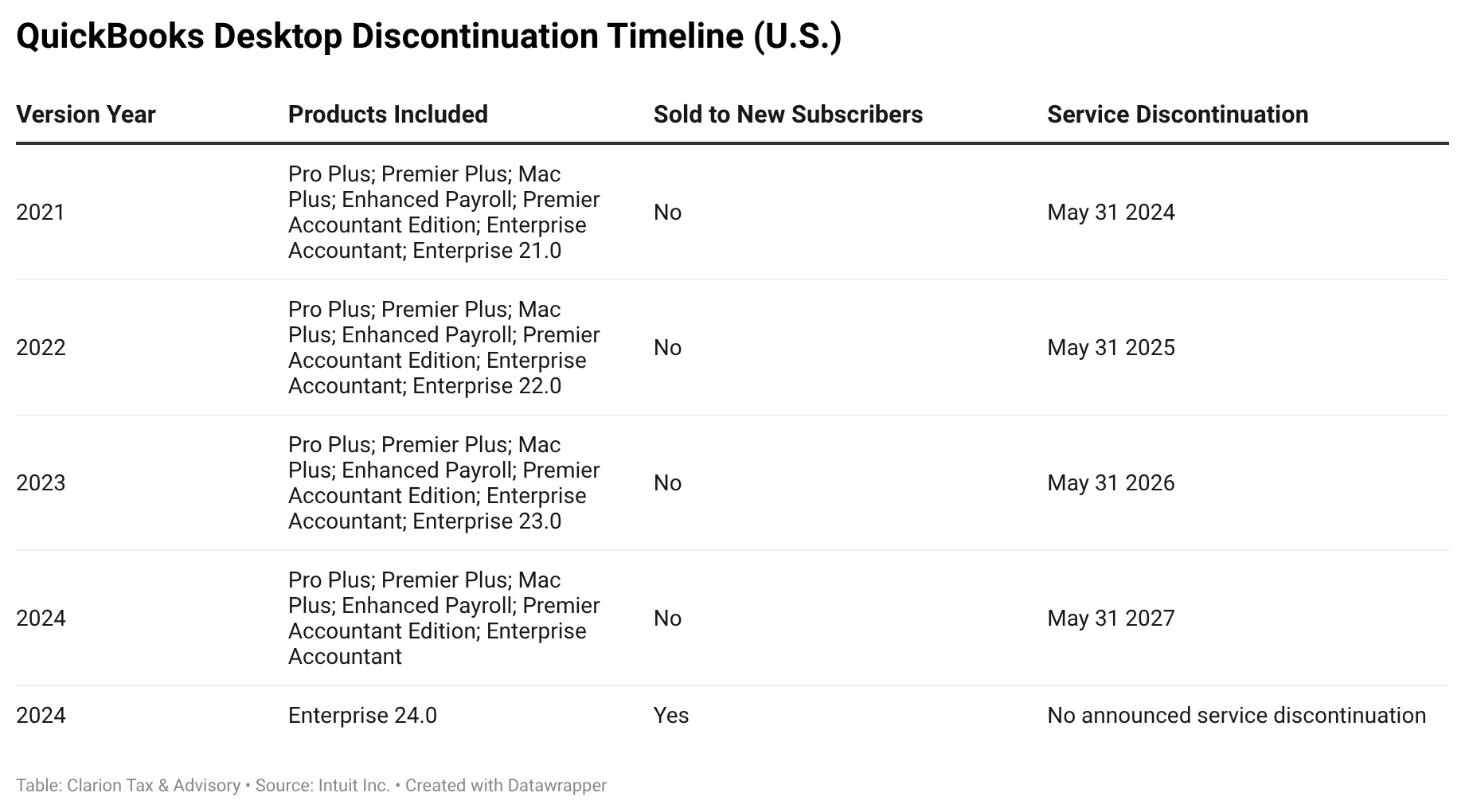
Intuit announced in late 2023 that it would stop selling QuickBooks Desktop to new subscribers in the United States after September 30, 2024, for the following products:
- QuickBooks Desktop Pro Plus;
- QuickBooks Desktop Premier Plus;
- QuickBooks Desktop Mac Plus; and
- QuickBooks Desktop Enhanced Payroll.
However, QuickBooks Enterprise 24.0 currently remains available for purchase and was unaffected by this announcement.
Intuit typically discontinues QuickBooks Desktop editions after three years, usually on May 31. In line with this policy, Intuit discontinued QuickBooks Desktop 2021 on May 31, 2024, and QuickBooks Desktop 2022 on May 31, 2025. QuickBooks Desktop 2023 will be discontinued on May 31, 2026, and QuickBooks Desktop 2024 will be discontinued on May 31, 2027.
The full product line that is typically discontinued includes:
- QuickBooks Desktop Pro Plus;
- QuickBooks Desktop Premier Plus;
- QuickBooks Desktop Mac Plus;
- QuickBooks Enterprise Solutions;
- QuickBooks Premier Accountant Edition; and
- Prior versions of QuickBooks Enterprise Accountant.
While Intuit did not release QuickBooks Desktop 2025 products, it opted to release only updates for QuickBooks Desktop Enterprise 24.0 in 2025.
Are existing QuickBooks Desktop users required to migrate immediately?
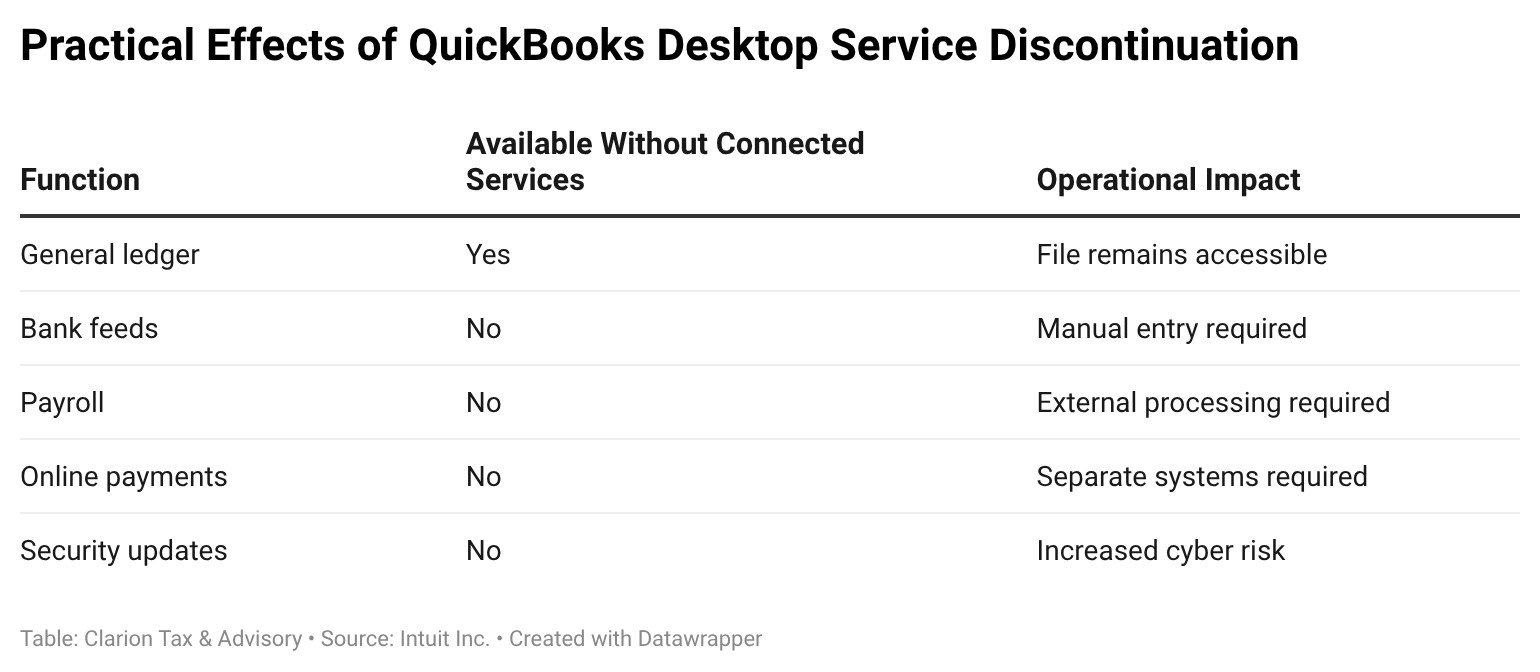
Existing Desktop users are not required to migrate immediately; however, technical support, security updates, online bank feeds, and connected services such as Desktop Payroll and Desktop Payments are ending on a rolling schedule, creating practical "deadlines" for CPAs and their clients to avoid interruptions.
In essence, the absence of an immediate deadline does not eliminate the need for planning. A likely risk posed by inadequate preparation is a reactive migration rather than a strategic one due to service disruptions during a payroll cycle or during bank reconciliation, for instance.
What does "service discontinuation" mean in practice for Desktop users?
In practical terms, service discontinuation increases the likelihood that practitioners and clients will experience degraded software performance and, ultimately, reduced productivity due to unsupported features or limitations. For example, QuickBooks Desktop relies heavily on connected services for critical functionality, such as payroll processing, bank feeds, electronic payments, online backups, and important security updates.
When specific versions of Desktop reach their end-of-service date, many ancillary services are disabled. And while access to the core accounting file may remain intact, the termination of the connected services renders previously used workflows inoperable and reduces efficiency. For example, payroll must be processed through alternative systems and bank transactions must be entered manually.
Of equal importance, the loss of security updates poses significant cybersecurity risks and may conflict with cyber insurance requirements. Overall, CPAs should avoid using unsupported software, as it may raise questions about reasonable care and professional judgment.
Which operational failures are clients most likely to encounter first?
Bank feeds and payroll services are the most likely first points of failure. Bank feeds require manual transaction entry, which decreases efficiency and increases the risk of errors. Payroll service disruptions may create compliance exposure, especially for clients with more complex withholding or filing requirements.
Another major operational risk is backups. Many clients assume backup functionality is occurring automatically and, unfortunately, only realize backups were discontinued after a major system failure. These failures often come to light during critical periods, such as month-end or year-end close, when practitioners have limited options to respond.
Why does continued reliance on Desktop create a risk management issue for CPA firms?
The utilization of unsupported Desktop software poses various risk management issues for CPA firms, especially around cybersecurity, data integrity, audit defensibility, and even client disputes.
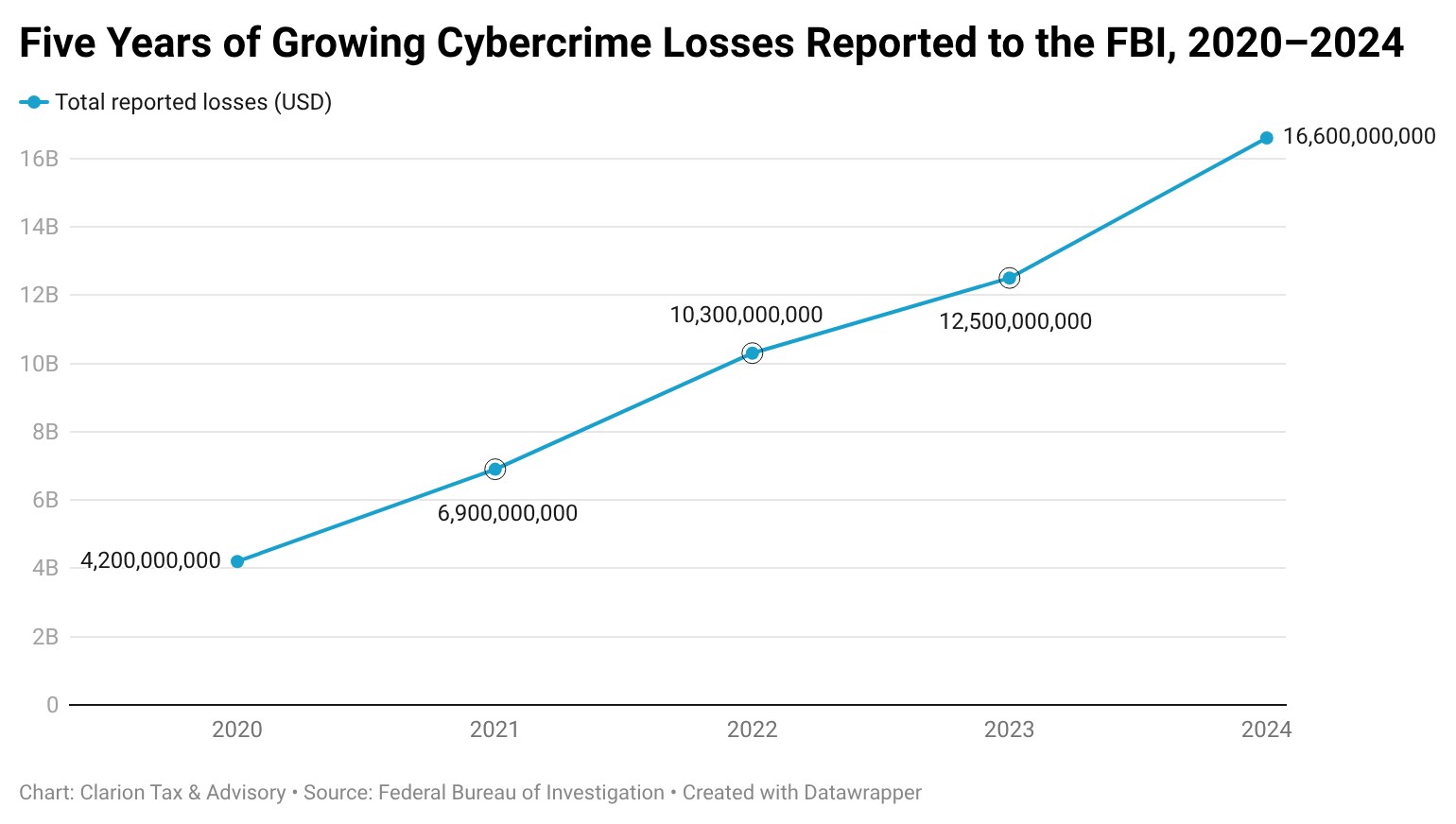
With the lack of critical security updates, firms face significant legal and reputational risks from cybersecurity incidents such as phishing, ransomware and business email compromise (BEC). According to Plexus Technology, a managed IT provider serving accounting and financial firms, "[c]yberattacks on accounting firms have surged 300% since 2020." This underscores the importance of using software that receives regular security updates - it's non-negotiable.
It is worth noting that if a firm is aware that a client uses software with discontinued services or security updates, it's advisable for firm staff to thoroughly document recommendations, limitations and client decisions to mitigate potential reputational and professional liability should preventable service disruptions occur.
What backup strategy is appropriate for QuickBooks Desktop going forward?
A defensible backup strategy for clients using QuickBooks Desktop should begin with a written firm-wide policy that establishes requirements for each client to have frequent backups, producing multiple immutable and versioned copies in distinct cloud-based locations, with strict encryption, deletion and retention rules. It is critical that firms also require periodic testing of backup files to ensure adequate restoration should it be required in the future.
What accounting records should be archived before any migration occurs?
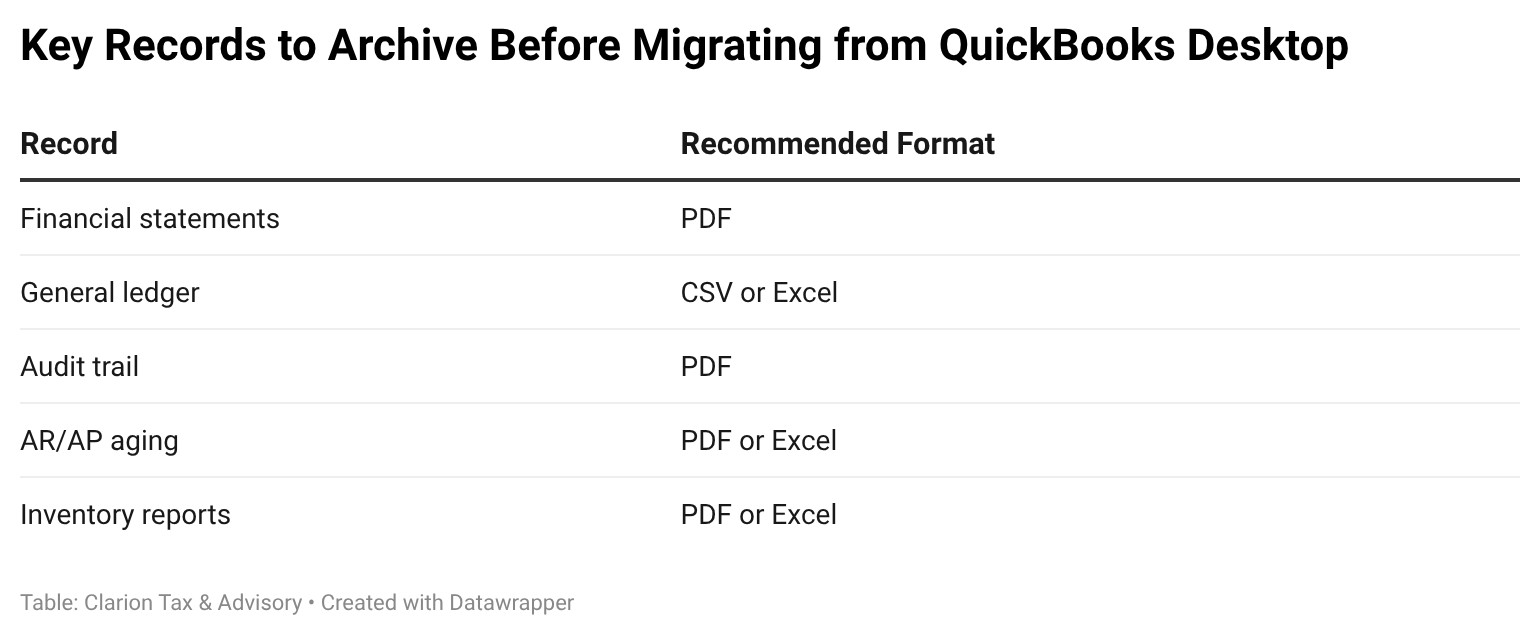
Firms should identify a minimal archival package for each client and year, regardless of whether clients are migrating away from QuickBooks Desktop. This package typically includes finalized financial statements, detailed general ledger reports, audit trail information and, if applicable, supporting schedules for accounts receivable, accounts payable and inventory.
Generally speaking, firms should never rely on the ability to open a Desktop file in the future, as issues such as software dependencies, operating system changes and licensing limitations may impair access.
In essence, archiving standardized reports in non-proprietary formats helps ensure long-term accessibility and defensibility.
How should CPAs help clients evaluate alternatives to QuickBooks Desktop?
While QuickBooks Online often appears to be the most natural migration path for businesses moving away from QuickBooks Desktop, CPAs should encourage clients to evaluate alternatives based on operational complexity and long-term reporting needs rather than familiarity alone.
For many small and mid-size U.S. businesses, QuickBooks Online remains a practical first option. It offers the closest functional continuity from Desktop and an abundant ecosystem of native third-party integrations. QBO is generally well-suited for service-based and product-based businesses with up to several dozen employees and annual revenue ranging from the low six figures to the low millions, depending on complexity.
Xero is a strong alternative for businesses that prioritize collaboration and multi-user access. Its unlimited-user model and efficient bank reconciliation tools make it particularly attractive for firms where owners, internal staff and external accountants all require regular access. Xero is often a good fit for service-based companies and lower mid-market businesses with relatively straightforward inventory and payroll needs.
For larger or rapidly scaling organizations, particularly those with multiple entities, international operations or complex reporting requirements, NetSuite may be a better fit. While significantly more costly and resource-intensive to implement, NetSuite offers scalability and controls that exceed those of basic, entry-level accounting software.
In addition to core platforms, CPAs should consider supporting tools that improve workflow and controls. Applications such as Double (formerly Keeper) for close management, RightTool for enhanced transaction control in QuickBooks Online, and Hubdoc for document capture can materially improve efficiency and audit readiness when paired with the appropriate accounting system.
What conversion challenges should CPAs anticipate when clients migrate?
Migrations rarely fail because of accounting software. Most conversion difficulties stem from data complexity, unrealistic deadlines or insufficient preparation. Unsurprisingly, most migration issues arise from advanced customizations or large historical datasets in QuickBooks Desktop. Firms must proactively factor these variables into migration timelines.
For example, advanced customizations such as inventory and job costing are common stumbling blocks. Similarly, valuation methods, quantity tracking and work-in-progress calculations do not always map cleanly to new systems, requiring manual adjustments or reconfiguration. Class and location tracking may also need to be redesigned rather than directly replicated, depending on the new accounting system.
Historical data also presents a major pain point for firms. Many platforms limit transaction details in imports, omitting key data objects such as attachments (usually receipts and invoices) or audit trails. This makes it imperative for firms to determine in advance how much historical data is necessary for reporting and client operations, and to create a preservation strategy to support data such as attachments.
When is the right time to migrate - and when is it reasonable to wait?
There is no one-size-fits-all solution for the ideal time to migrate clients. Firms should instead approach every QuickBooks Desktop migration as part of a broader practice management strategy that aims to limit risk and provide a seamless customer experience. To ensure a smooth transition for staff and clients alike, begin by establishing firm-wide policies and procedures for handling migrations.
Practitioners should start by evaluating clients and segmenting them into low-, medium- and high-risk buckets based on their use of advanced features (inventory, payroll, job costing, accounts receivable, accounts payable, tailored reporting, and integrations), industry requirements, and vulnerabilities. Based on these decision criteria, CPAs should map client journeys for the unique segments, with the primary goal of reducing firm risk.
At a high level, this should include establishing the firm s use of practice management software, selecting alternative accounting software options and integrations, and crafting all client-facing communications to oversee the migration from start to finish. Considerations such as firm recommendations, anticipated implementation phases, timelines, and pricing for each path should be templated in advance.
While there are different viable schools of thought, a suggested approach is to begin with the lowest-risk clients who have a simpler QuickBooks Desktop configuration and would easily adapt to the new software, allowing teams to test and iterate on the migration process. Afterward, it is crucial to migrate high-risk clients utilizing discontinued QuickBooks Desktop software and manual backups, as they are most likely to suffer catastrophic failures. This will mitigate firm risk and ensure clients receive a quality service. From there, migrate medium-risk clients with complex accounting configurations that would see service improvements after upgrading to new integrated accounting systems.
On the other hand, high-risk clients with complex accounting configurations that require more extensive planning to evaluate and implement suitable integrated accounting systems for their needs should be delayed and migrated carefully to maintain service continuity and mitigate risk. It is also recommended to operate the new integrated accounting systems in parallel with QuickBooks Desktop to prevent data loss.
Additionally, accountants should delay migrating high-risk clients with inaccurate books, unreconciled balances or other major internal issues until they are well-positioned for a successful migration. It is especially prudent for practitioners to avoid a premature migration when clients are being audited or approaching sensitive windows like month-end, quarter-end or year-end close processes. Overall, each client warrants an independent evaluation of their current system and a tailored plan that aligns exceptional service with risk management.
Positioning CPAs and Small Businesses for a Smoother, More Secure Migration
In closing, there is no doubt that small businesses and practitioners alike will have to navigate the challenges of migration, but they will also benefit greatly from more regular security updates and feature releases that improve workflows. With a carefully planned and executed migration approach tailored to each client, CPAs can reduce risk and better position their clients for long-term success.
About the Authors:
Ryan J. Almusawi, EA, MPAcc, practices before the IRS as an Enrolled Agent with his tax and bookkeeping firm, Clarion Tax & Advisory. He may be contacted at ryan@clarion.tax.
Nancy V. Cossio is a tax manager at Clarion Tax & Advisory. She may be contacted at nancy@clarion.tax.


References:
DeLong, Dan. "QuickBooks Desktop Cancellations: What Happens Next and How to Stay Ahead." School of Bookkeeping, 9 May 2025, www.schoolofbookkeeping.com/blog/QBDTStopSell. Accessed 22 Dec. 2025.
Federal Bureau of Investigation and Internet Crime Complaint Center. 2024 Internet Crime Report. 2025, www.ic3.gov/AnnualReport/Reports/2024_IC3Report.pdf. Accessed 22 Dec. 2025.
Federal Bureau of Investigation and Internet Crime Complaint Center. 2023 Internet Crime Report. 2024, www.ic3.gov/AnnualReport/Reports/2023_IC3Report.pdf. Accessed 22 Dec. 2025.
Gould, Victoria, and Victoria Gould. "Top 5 Cybersecurity Threats Facing Accounting Firms in 2025." Plexus Technology, 14 July 2025, plexustechnology.com/top-5-cybersecurity-threats-facing-accounting-firms-in-2025.
Intuit, Inc. "Move From QuickBooks Desktop to QuickBooks Online." QuickBooks Support, 2024, https://quickbooks.intuit.com. Accessed 22 Dec. 2025.
Intuit Inc. "QuickBooks Desktop 2023 Service Discontinuation Policy." Intuit, 24 Nov. 2025, https://quickbooks.intuit.com. Accessed 15 Dec. 2025.
Intuit, Inc. and Firm of the Future Team. "QuickBooks Desktop to Stop Selling to New U.S. Subscribers." Firm of the Future, 30 Nov. 2023, www.firmofthefuture.com/product-update/faq-desktop-stopsell. Accessed 22 Dec. 2025.
Intuit, Inc. and QuickBooks Online Team. "QuickBooks Desktop to Stop Selling to New U.S. Subscribers." QuickBooks Blog, 1 Feb. 2024, https://quickbooks.intuit.com. Accessed 22 Dec. 2025.
"Is QuickBooks Desktop 2022 Software Going to Be Discontinued." QuickBooks Support, uploaded by JIBIT and Bryan M, 14 May 2024, https://quickbooks.intuit.com. Accessed 22 Dec. 2025.
Thanks to the Sponsors of Today's CPA Magazine
This content was made possible by the sponsors of this issue of Today's CPA Magazine: